X7: Utilizing Libraries
In the development of the understanding of complex phenomena, the most powerful tool available to the human intellect is abstraction. Abstraction arises from the recognition of similarities between certain objects, situations, or processes in the real world and the decision to concentrate on these similarities and to ignore, for the time being, their differences. — C.A.R. Hoare
Civilization advances by extending the number of important operations which we can perform without thinking. — Alfred Lord Whitehead
Abstraction is the process of ignoring minutiae and focusing on the big picture. In modern life, we are constantly confronted with objects much too complex to be understood by the average person. For example, to really grasp how a television works, one must have extensive knowledge of electrical engineering, electronics, and physics. However, most people watch and operate television sets every day. This is possible because they abstract away unnecessary details and focus on the features relevant to their needs — it is a box with several inputs (power cord, on/off button, channel selector, and volume control) and two outputs (picture and sound). This degree of understanding enables them to watch and have control over the television set without knowing the specifics of television's functionality.
You have already been introduced to the idea of abstraction in programming through the use of functions. In a programming language, a function represents a unit of computation from which the details are abstracted away. For example, the computation involved in finding the square root of a number is certainly not trivial, but the Math.sqrt function encapsulates this multistep process in a single function call. Without worrying about how it computes the square root, a programmer can call the function and use it to obtain a result. In this chapter, you will learn to define and use your own full-featured functions and incorporate them into your Web pages. In addition, you will learn to utilize libraries of functions so that general-purpose abstractions can be defined once and used repeatedly.
General-purpose Functions
In Chapter X5, you learned how to create functions to simplify the body of a Web page. By moving all the JavaScript statements associated with a button click into a function in the head, the button is simplified, and the body elements are much easier to identify and visualize. The functions that you wrote were of a very simple format — they did not take any inputs (instead, they accessed values directly from text or number boxes) nor did they return a value (instead, they displayed their result in the page). The more general form of a JavaScript function is as follows:
    function FUNCTION_NAME(PARAMETER1, PARAMETER2, ...) {
      STATEMENTS_TO_PERFORM_THE_DESIRED_COMPUTATION

      return OUTPUT_VALUE;
    }
- Parameters are optional variables (separated by commas) that appear in the parentheses following the function name. They correspond to the function's inputs, so a function that requires one input value (such as
Math.sqrt) would have one parameter inside the parentheses, while a function that requires two input values (such asMath.max) would have two parameters. When the function is called, the input values specified in the call are assigned to the parameter variables, which can then be used in performing the computation. If the function has no inputs, as was the case with the simple functions in Chapter X5, then there will be no parameters listed inside the parentheses. - A return statement is an optional statement that can appear at the end of a function definition. A return statement consists of the word
return, followed by a variable or expression. When the statement is executed, the variable or expression is evaluated, and the resulting value is returned as the output of this function.
For example, consider the following simple function definition:
    function InchesToCentimeters(inches) {
      cm = inches * 2.54;
      return cm;
    }
This function has one parameter, inches, that appears inside the parentheses. When the function is called, a number must be specified as the input to the function. For example,
InchesToCentimeters(10)
The input specified in the function call is automatically assigned to the parameter variable when the function is called. In this case, the input value 10 is assigned to inches. The first statement in the function then uses that variable to calculate the corresponding distance in centimeters (10 * 2.54 = 25.4) and assign it to the variable cm. Finally, the return statement returns that value. If the function is called again, with a different input value, the same sequence occurs. For example, the call InchesToCentimeters(20) would result in the parameter variable being assigned 20 and the function returning 50.8.
The HTML document in EXAMPLE 7.1 contains two function definitions in the script element. The first is the InchesToCentimeters function from above; the second is the parameterless ShowConversion function that is called when the button is clicked. The ShowConversion function accesses the number from the box and calls the InchesToCentimeters function to perform the conversion. Both values are then displayed in the page.
EXERCISE 7.1: Confirm that the Web page from EXAMPLE 7.1 behaves as described by clicking the "See in Browser" button and converting the default inch to centimeters. Then, use the page to convert the following numbers of inches to centimeters:
10 39.4 100 200
The statements inside a function may involve calls to predefined functions (e.g., Math.sqrt) or even to other functions defined in the page. For example, the following function converts a distance from feet to meters. It does so by taking its input (a distance in feet), converting it to inches, calling the InchesToCentimeters function to convert it to centimeters, and finally converting the centimeters to meters.
    function FeetToMeters(distanceInFeet) {
      inches = 12*distanceInFeet;
      cm = InchesToCentimeters(inches);
      meters = cm/100;
      return meters;
    }
EXERCISE 7.2: Copy-and-paste this function into the script element in EXAMPLE 7.1, below the InchesToCentimeters function. Then, modify the ShowConversion to perform the feet to meters conversion. It should access the distance in the box (now assumed to be in feet), call the FeetToMeters function to convert that distance into meters, and then display it. The message and the button label should be updated accordingly.
Test your updated page thoroughly to confirm that it works as desired.
Example: Point Distance Revisited
While the InchesToCentimeters and FeetToMeters functions have the advantage of being simple and easy to understand, they are far from compelling. The conversions could easily have been embedded directly in the ShowConversions function. To see the value of a general-purpose function, consider a variant of the Distance page from Chapter X6 (EXAMPLE 6.6). If you recall, that page had number boxes for the coordinates of two points, and used a sequence of statements to calculate the distance between those points:
    xDiffSquared = (x1-x2)**2;
    yDiffSquared = (y1-y2)**2;
    distance = Math.sqrt(xDiffSquared + yDiffSquared);
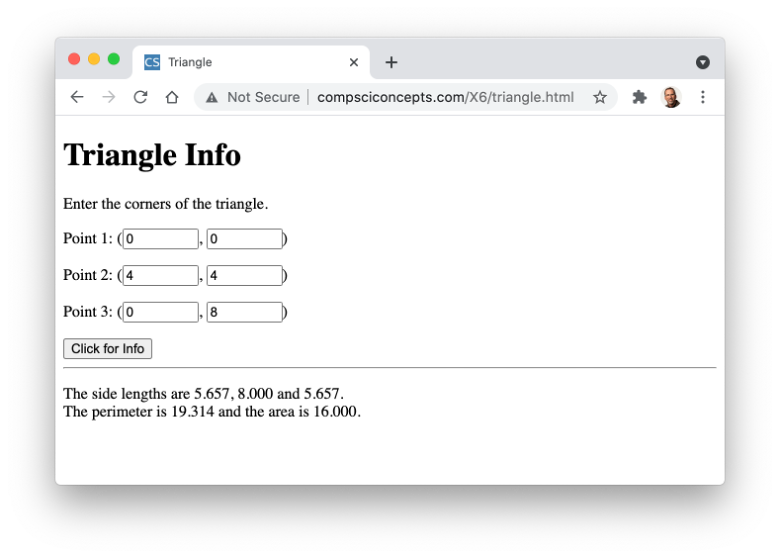
The HTML document in EXAMPLE 7.2 generalizes this page to now include coordinates for three points, the corners of a triangle. The statements for calculating distance are duplicated three times to calculate the lengths of the three sides. The side lengths are then summed to calculate the triangle's perimeter.
EXERCISE 7.3: Confirm that this page behaves as described by clicking the "See in Browser" button and calculating the side lengths and perimeter using the default points. Use the page to determine the perimeter of a triangle with corners (5,5), (12,10) and (10,15).
Clearly, this implementation is not ideal. The duplication of the statements for calculating distance yields a function that is long and tedious. Plus, if an error was found in the formula, it would need to be fixed in all three places. A better solution is to define a general-purpose function that calculates the distance between two points, then call that function three times. The HTML document in EXAMPLE 7.3 reimplements the page using a function.
The definition of the Distance function contains all the messy details involved in calculating the distance between two points. Once that function is defined in the page, it can be called repeatedly. The ShowInfo function is shorter and simpler than before. Since the name of the Distance function reasonably describes its purpose, the calls to that function are easily understood even if the details of how the function works are not.
EXERCISE 7.4: Confirm that this page behaves the same as the page from EXAMPLE 7.2. Then, modify the HTML document so that the side lengths are rounded to three decimal places when displayed. (Recall the .toFixed() suffix from Chapter X6.)
Example: Pick-4 Revisited
As the Triangle page demonstrated, a general-purpose function can remove redundancy and simplify the code when a calculation is needed more than once. Another example of this is the Pick-4 page from Chapter X6 (EXAMPLE 6.7). Since four different balls needed to be drawn, there were four statements that contained the same expression:
    pick1 = Math.floor(numBalls*Math.random() + 1);
    pick2 = Math.floor(numBalls*Math.random() + 1);
    pick3 = Math.floor(numBalls*Math.random() + 1);
    pick4 = Math.floor(numBalls*Math.random() + 1);
Devising the correct expression to generate a random integer in the range 1..numBalls was not a trivial task. It required mathematical reasoning and thorough testing to ensure that the expression worked perfectly. Once verified, the expression is still difficult to understand and modify. For example, suppose we learned that lottery balls were numbered starting at 0. We would need to modify the expression to generate random integers from the range 0..(numBalls-1). Determining how to modify it appropriately is almost as much work as devising the original formula! A better alternative is to invest the effort to create a general-purpose function, which could be used to generate a random integer from any specified range. The following function does that:
    function RandomInt(low, high) {
        return Math.floor(Math.random()*(high-low+1)) + low;
    }
This function takes two inputs, the low and high integers from the desired range. It then uses those inputs as part of a generalized expression that generates a random integer in the range low..high. For example,
    RandomInt(1, 42)		returns a random integer from the range 1..42

    RandomInt(0, 41)		returns a random integer from the range 0..41

    RandomInt(200, 250)		returns a random integer from the range 200..250
The HTML document in EXAMPLE 7.4 reimplements the Pick-4 page using the above RandomInt function. The function definition is added within the script tags in the head of the page, above the Lottery function. The inclusion of the RandomInt function in the page allows for the statements in the Lottery function to be simplified. Instead of repeating the complex expression for generating the random picks, each pick can be generated by a call to the RandomInt function.
EXERCISE 7.5: Confirm that the Web page from EXAMPLE 7.4 behaves as described by clicking the "See in Browser" button and generating Pick-4 numbers using different numbers of balls. How many picks did you need to generate before the number 1 was included? Does it depend on the number of balls? Should it?
EXERCISE 7.6: Modify the Lottery function from EXAMPLE 7.4 so that it picks balls from the range 0..(numBalls-1). Test your modification multiple times to ensure that the numbers never include numBalls. How many picks did you need to generate before the number 0 was included?
Functions simplify the programmer's task in two important ways. First, functions help minimize the amount of detail that a programmer must keep track of. Because the Math.sqrt function is available, the programmer does not need to know the sequence of steps involved in computing a square root. Instead, they only need to know how to call the Math.sqrt function. In the Pick-4 example, defining and debugging the RandomInt function once means that it can be used in this and other pages without having to remember the logic behind it. Second, functions help minimize the length and complexity of code. Because the Math.sqrt function is available, the square root of a value can be obtained via a single call to this function. This significantly reduces code complexity because the number of steps otherwise required to compute the square root would be considerable. Likewise, the modified Pick-4 page from EXAMPLE 7.4 is easier to understand because the messy details are moved to the RandomInt function.
 Designer Secrets
When you define a function, you are creating an abstraction that can subsequently be used in any page that contains the function definition. In the case of the RandomInt function, you could add this function to any page that needed to generate random integers. This greatly simplifies the development of those pages.
It is important to choose a function name that clearly identifies its purpose (or functionality, if you will). When a developer sees an expression involving a call to RandomInt, its meaning is obvious. The developer does not need to view the function definition to understand what the code does — the name allows them to abstract away those details and focus on its functionality.
Libraries of Functions
If a function or collection of functions is especially useful, it might be included in many pages. For example, the RandomInt function could prove useful in a variety of applications, from games, to simulations, to control systems. It would become tedious to copy-and-paste the function definition into every page that needs it. Even worse, duplication of the same function definition in multiple locations can lead to major maintenance issues. To fix an error or make a modification, you would need to locate every page that contains that definition and update them all.
Fortunately, there is a better way to manage functions that are to be shared across multiple pages. Useful functions can be placed in a separate text file known as a library file. That library file of functions can then be loaded into any Web page using a script element with a src attribute specifying the file name:
<script src="LIBRARY_FILE_NAME"></script>
When placed in the head of a Web page, this script element has the effect of loading those function definitions from the specified file, which can then be called within the page (the same as if they were entered directly into the page). Note that nothing appears between the script tags. You can think of the src attribute as directing the browser to retrieve the functions from the specified library file and insert them between the script tags. If you did place anything in between the script tags, it would be overwritten when the library contents are loaded.
Designer Secrets
Library files are to JavaScript what Cascading Style Sheets were to HTML. As you learned in Chapter X3, a Cascading Style Sheet is a file that contains style property choices (e.g., text and background colors, font family, indentation conventions). That file can be loaded into every Web page on a site (using a link tag) to ensure that styling is consistent across the site. Similarly, a library file is a text file that contains JavaScript function definitions. That file can be loaded into every Web page on a site (using a script tag) to ensure that the same functions are available across the site.
The random.js Library
The RandomInt function, along with three other useful functions involving randomness, are defined in a library file named random.js (which is accessible online at https://freecsc.com/random.js). Descriptions of the four functions in this library file are provided in FIGURE 1.
| Function | Input(s) | Description | Example |
|---|---|---|---|
RandomInt | two integers | returns a random integer between the 1st and 2nd input integers |
RandomInt(2, 5) → integer from 2..5 |
RandomNum | two numbers | returns a random number between the 1st and 2nd input numbers |
RandomNum(2.5, 5.8) → number from [2.5, 5.8) |
RandomChar | one string | returns a random character from the input string |
RandomChar('abc') → either 'a', 'b' or 'c' |
RandomOneOf | one list of items | returns a random item from the list | RandomOneOf(['yes', 'no', 'maybe']) → either 'yes', 'no' or 'maybe' |
FIGURE 1. Functions defined in the random.js library.
Any page can load the random.js library by including the following script element in the head.
<script src="https://freecsc.com/random.js"></script>
This element loads the contents of the library file into the page, making the definitions of the functions RandomInt, RandomNum, RandomChar and RandomOneOf accessible within that page. Utilizing a library file is the ultimate application of abstraction. The page developer can use the functions from a library file without even looking at their definitions!
The HTML document in EXAMPLE 7.5 reimplements the Pick-4 page (EXAMPLE 7.4) using the random.js library. The first script element in the head loads the random.js library file into the page, making the functions from that file (including RandomInt) accessible within the page. The second script element contains the page-specific function Lottery, which utilizes the RandomInt function to generate the random picks as before. Note that details of the RandomInt function are completely hidden, making this final version of the Pick-4 page the most succinct and clear.
EXERCISE 7.7: Confirm that the Web page from EXAMPLE 7.5 behaves as described by clicking the "See in Browser" button and generating Pick-4 numbers using different numbers of balls. Similar to the changes you made in EXERCISE 7.5, modify your page so that balls are numbered starting at 0.
 Common Errors to Avoid
There are four common errors that beginning programmers make when using function libraries:
- The script tags are malformed, or the name/address of the library is incorrect. In either case, the library will fail to load. This will not produce an error but any subsequent attempt to call a function from the library will.
- JavaScript code (e.g., a function definition) appears within the
scriptelement. Any code that appears within the element will be ignored by the page. You can think of thesrcattribute as causing the contents of the library to be inserted between thescripttags, overwriting any other code placed there. - The
scriptelement for loading the library file is placed inside anotherscriptelement. While the head of a page may contain more than onescriptelement, thosescriptelements cannot be nested inside otherscriptelements. A nestedscriptelement will not be recognized by the browser. - The library file contains HTML elements. A library file should only contain JavaScript code. Any non-code elements in the file will cause an error when the library file is loaded.
Example: Dice Simulations
The HTML documents in EXAMPLES 7.6 and 7.7 further demonstrate the utility of the random.js library. Both documents utilize functions from the library to perform the same task — simulating the roll of two dice and displaying that roll as die images. Note that image files for each of the six die faces are stored in the book's Images directory using the names die1.gif, die2.gif, ..., die6.gif.
In EXAMPLE 7.6, the RandomInt function is called to generate random integers in the range 1 to 6. Those random integers are then used to construct the Web addresses of the die images. For example, if the variable roll1 is randomly assigned the integer 4, then:
	die1Img.src = 'https://freecsc.com/Images/die' + roll1 + '.gif';
		          ⇊
	              'https://freecsc.com/Images/die' + 4 + '.gif';
		          ⇊
	              'https://freecsc.com/Images/die4.gif';
In EXAMPLE 7.7, the RandomOneOf function is called to select a random file name from a list of options. The file name is then used to construct the Web addresses of the die images. For example, if the variable roll1 is randomly assigned the string 'die6.gif,' then:
	die1Img.src = 'https://freecsc.com/Images/die' + roll1;
		          ⇊
                      'https://freecsc.com/Images/' + 'die6.gif';
		          ⇊
                      'https://freecsc.com/Images/die6.gif';
EXERCISE 7.8: Confirm that the Web pages from EXAMPLES 7.6 and 7.7 behave as described by clicking the "See in Browser" button and simulating dice rolls. The odds of rolling doubles (two dice with the same number of dots) are 1 out of 6. Simulate 30 dice rolls using each of the pages. Did either simulation produce the expected 5 doubles out of 30 rolls? If not, were the numbers close to 5? Add the two numbers together. Is this total close to 10?
EXERCISE 7.9: Suppose we wanted to modify the dice simulation pages from EXAMPLES 7.6 and 7.7 to utilize 4-sided pyramid-shaped dice (with 1 to 4 dots on a side). What changes would need to be made to each page to accomplish this? Enter your changes and confirm that they work as described.
Common Errors to Avoid
The RandomOneOf function from the random.js library requires a list of items as input. That list must be enclosed in square brackets with the items separated by commas. For example, the following call would return one of the three words ('yes', 'no', or 'maybe'), chosen at random.
RandomOneOf(['yes', 'no', 'maybe'])
A common mistake when calling RandomOneOf is to forget the brackets when specifying the list of options, e.g.,
RandomOneOf('yes', 'no', 'maybe')
This mistake will not necessarily produce an error but will definitely produce unintended results. Always be sure that the RandomOneOf function is called with a valid list (with square brackets).
Example: Random Sequence Generation
Many secure computer systems require the use of complex passwords that are difficult to guess. One way to create secure passwords is to automatically generate them as random sequences of characters. While a hacker might be able to guess your password if it is the name of your family dog or your fifth-grade teacher, it is extremely unlikely that they would be able to guess a random password such as d6CW4!m.
Recall that the RandomChar function from the random.js library takes a string as input and returns a randomly selected character from that string. The HTML document in EXAMPLE 7.8 utilizes this function to generate a random character sequence, which could be used for password creation. The page contains a text box in which the user enters the characters to choose from. By default, this box contains the entire alphabet, but the user can enter any sequence of characters they desire (e.g., '0123456789' to generate random numbers). When the button is clicked, the contents of the text box is accessed and the RandomChar function is called to randomly select three characters from the box contents. The three random characters are glued together (using +) and displayed in the page.
EXERCISE 7.10: Confirm that the Web page from EXAMPLE 7.8 behaves as described by clicking the "See in Browser" button and generating random 3-letter sequences.
There are approximately 550 different 3-letter words in the English language and 263 = 17,576 possible 3-letter sequences. As a result, the likelihood of obtaining a word at random is 550/17,576, or close to 1/32. Use the page to generate 32 random 3-letter sequences. Did you obtain any words? Would it surprise you if you didn't obtain any words, or obtained more than one?
EXERCISE 7.11: The 10 most frequently used letters in the English language, ordered by frequency, are e, t, a, o, i, n, s, h, r and d. As a result, if you generated random letter sequences using only these ten letters, you might expect to have a greater likelihood of obtaining words. Use the Web page from EXAMPLE 7.8 to generate random 3-letter sequences using "etaionshrd" as the possible characters. Do you obtain words more frequently than you did with the complete alphabet?
EXERCISE 7.12: Modify the HTML document in EXAMPLE 7.8 so that it instead generates random 4-letter sequences. Use your modified page to generate 4-letter sequences using the entire alphabet. How many sequences did you have to generate before you obtained an English word? Would you expect it to be more or less likely to obtain a 4-letter word at random when compared to 3-letter words? Explain your answer.
Designer Secrets
The decision as to when it is worthwhile to define a library file largely comes down to reusability. If you envision a function as being useful in more than one page, it is worth the effort to create a library file containing that function and load that library into all the pages that need it. This reduces redundancy, as there is only one copy of the function definition that is shared by the pages. Related functions can be placed in the same library file and loaded as a package (such as the four functions in random.js that all generate random values).
Functions that are specific to the current page and unlikely to be used in other pages, such as the parameterless functions that we have used to encapsulate the actions of a button click, should be defined directly in that page.
Putting It All Together
Although there is no scientific evidence that Extrasensory Perception (ESP) exists, some people claim to have the ability to predict the future. We can create a Web page that will allow you to test your supposed ESP powers. The page will allow you to guess a number from 1 to 3 and then will match your guess against a randomly generated number in that range. If you are correct more than a third of the time, which is what you would expect from random guesses, then you might claim to have some level of ESP. Or, realistically, you were just lucky and subsequent unlucky guesses would eventually balance things out (FIGURE 2).
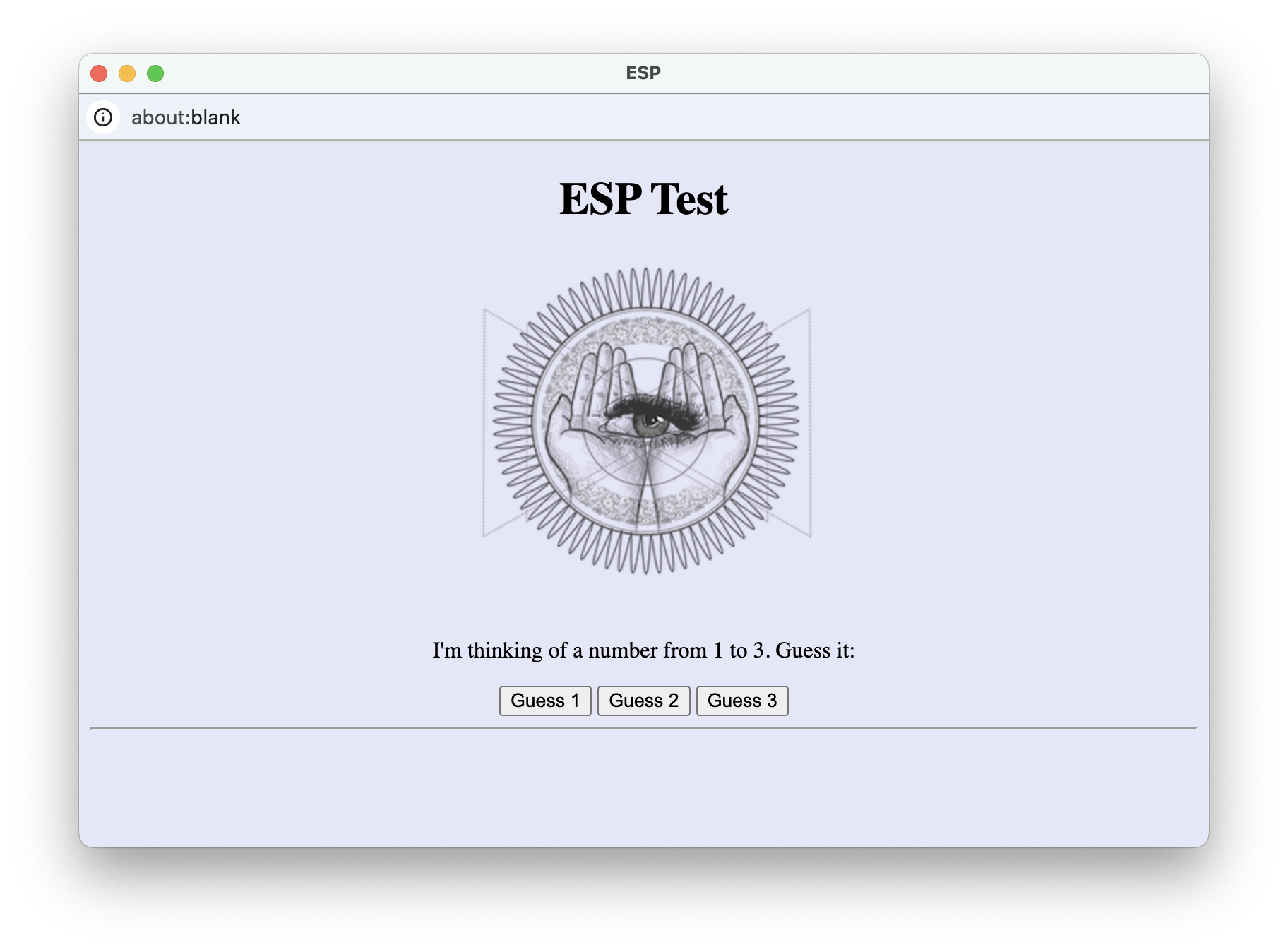
FIGURE 2. ESP Tester Page.
The HTML document in EXAMPLE 7.9 takes a first pass at implementing this page.
There are several details to note about this document and how it implements the desired appearance and behavior of the page.
- Since there are three possible guesses, there are three
buttonelements with corresponding functions. For example, clicking on the "Guess 1" button will call theGuess1function that displays the computer's random number and the user's guess of 1. Similarly, the "Guess 2" button calls theGuess2function and the "Guess 3" button calls theGuess3function. - Within the functions, the
RandomIntfunction from therandom.jslibrary is used to pick the computer's number. The library is loaded by a dedicatedscriptelement in theheadsection, with attributesrc="https://freecsc.com/random.js". - A
styleattribute in the<body>tag is used to center the page contents and set the background color to lavender. Similarly,spanelements are used in the message so that the numbers are purple and double-sized.
EXERCISE 7.13: Confirm that the Web page from EXAMPLE 7.9 behaves as described by clicking the "See in Browser" button and performing multiple tests. Conduct 9 tests and keep count of how many times you were correct. Were you correct more than 3 times? Conduct another 9 tests and add your number of correct guesses to the previous total. Were you correct more than 6 times?
In general, redundancy is something to avoid when developing an interactive Web page. Not only does it make the code longer and more difficult to read, but it also makes it harder to debug and/or modify. For example, if we decided that we wanted to change the message displayed in the ESP page, e.g., displaying the numbers in pink instead of purple, we would have to make identical modifications in all three functions.
Fortunately, parameters provide a way of avoiding such redundancy. Instead of three functions, identical except for the user's guess, we could have a single function with a parameter. When called, the user's guess would be specified as the input and then would be assigned to the parameter within the single function. EXAMPLE 7.10 makes this modification. Note that there is only one function, named Guess, which has a parameter named guess. That parameter variable is then used in the message to display the guess. For example, if the "Guess 1" button is clicked, then the call is Guess(1), which assigns 1 to the guess parameter and displays it as part of the message. Similarly, the "Guess 2" button calls Guess(2) and the "Guess 3" button calls Guess(3).
EXERCISE 7.14: Confirm that the Web page from EXAMPLE 7.10 behaves the same as the page from EXAMPLE 7.9. Do you find this version easier to read and understand? If we wanted to add a fourth button, enabling the user to guess 1 to 4, which document would be easier to update? Make the necessary modifications to one of these documents and confirm that it works as described.
Chapter Summary
- Abstraction is the process of ignoring minutiae and focusing on the big picture when performing a task.
- Functions simplify the programmer's task by (1) minimizing the amount of detail that the programmer must keep track of, (2) minimizing the size and complexity of code, and (3) centralizing code so that changes need only be made in one place.
- The general form of a JavaScript function is as follows:
function FUNCTION_NAME(PARAMETER1, PARAMETER2,...) { STATEMENTS_TO_PERFORM_THE_DESIRED_COMPUTATION return OUTPUT_VALUE; } - A parameter is a function-specific variable. When a function is called, its parameters are automatically assigned values corresponding to the input values in the call (the first input value is assigned to the first parameter variable, the second input value to the second parameter variable, ...).
- A return statement specifies the value that should be returned by the function. When a return statement is executed, the function call terminates, and the value specified in the return statement is returned as the output of that call.
- Parameters and a return statement are optional in a function definition. For example, a function that accesses data directly from text or number boxes may not require parameters. Likewise, a function that displays a message in a paragraph may not require a return statement.
- User-defined functions can be defined directly in the head of a Web page, enclosed in
scripttags. - Functions simplify the programmer's task by (1) minimizing the amount of detail that a programmer must keep track of and (2) minimizing the length and complexity of code.
- General-purpose functions that might be used in many different pages can be placed in separate library files and then loaded into Web pages as needed. To load a library file, use a
scriptelement of the form:<script src="LIBRARY FILENAME"></script>
- The
random.jslibrary (accessible ashttps://freecsc.com/random.js) defines functions for generating a random integer in a specified range (RandomInt), a random real number in a specified range (RandomNum), a random character from a string (RandomChar), and a random item from a list (RandomOneOf).
Projects
All projects should follow the basic design guidelines described in this and the previous chapters. These include:
- If there is a complex calculation that needs to take place in the page, especially one that is used more than once, a function with parameters and a return statement should be added to the head section within
scripttags. - If functions could reasonably be used in multiple pages, e.g., the random functions introduced in this chapter, then those functions should be defined in a library file that is linked to by the appropriate pages.
PROJECT 7.A: The ESP pages from EXAMPLES 7.9 and 7.10 provided separate buttons for each guess. As a result, expanding the numbers that can be guessed, say 1-5, will require adding more buttons. Consider an alternative approach using two number boxes. The first allows you to enter the maximum number that can be guessed; the second number box allows you to enter your guess. There is a single button in the page that submits that guess and produces a message similar to EXAMPLES 7.9 and 7.10. Note that the random pick should be between 1 and the number in the first box. For example,
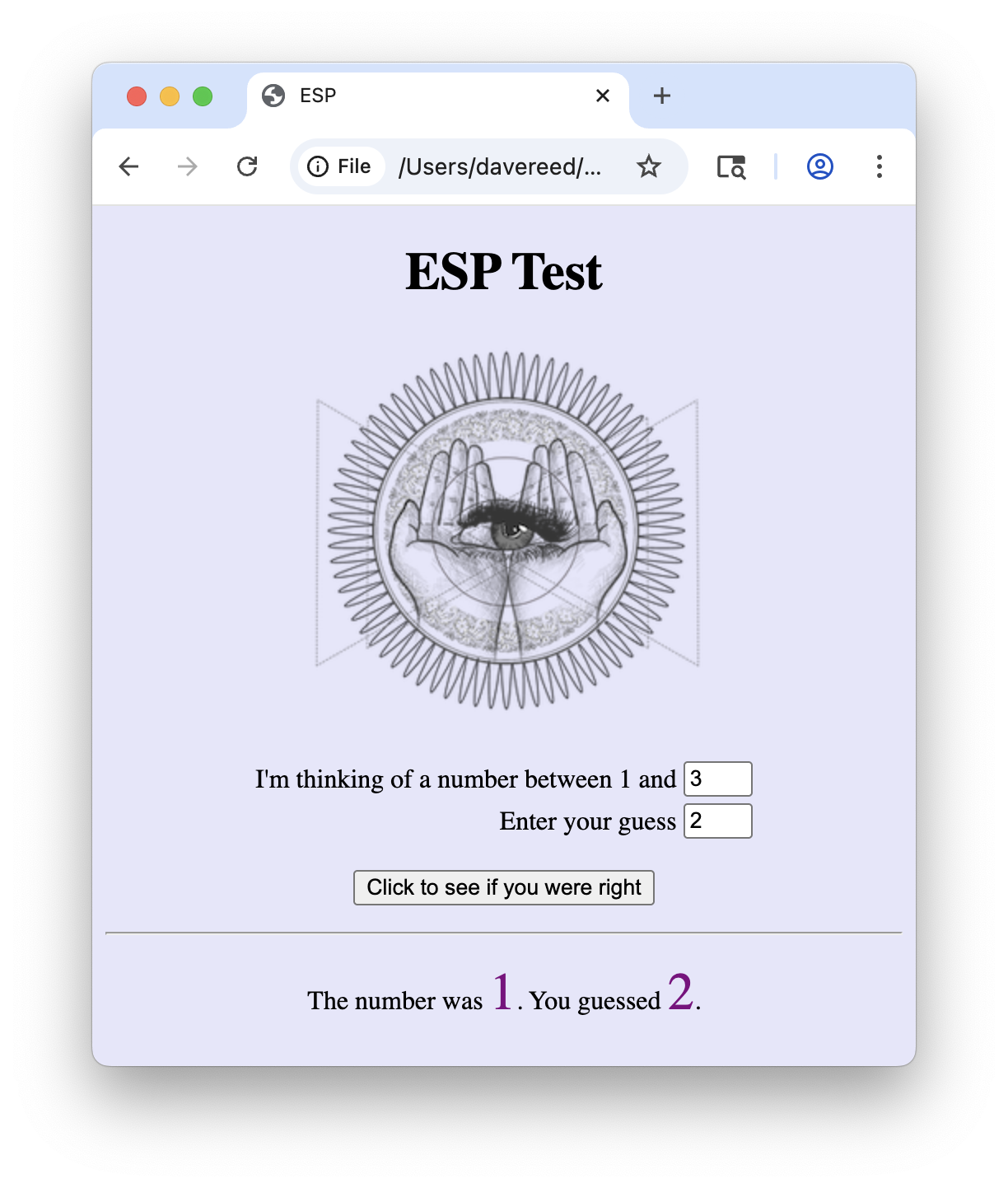
Download a copy of the HTML document in EXAMPLE 7.10 (by clicking on the Download link) and save it on your computer under the name esp.html. Using a text editor of your choice, modify the document so that it uses the two number boxes as described above.
Note: this design produces a more flexible page in that you can adjust the range of possible numbers simply by changing the number in a box. However, there is a price — if you accidentally enter a number from outside that range, there will be no error message. In EXAMPLES 7.9 and 7.10, it was impossible for you to enter an invalid number since three buttons corresponded to the three valid options.
PROJECT 7.B: Create a Web page named coin.html that contains a single coin image. When the user clicks on that image, a function in your page should randomly choose a coin face (using the RandomOneOf function from the random.js library) and display that face. There should be a caption below the coin image that initially displays 'Click on the coin to flip.' After each simulated flip, the caption should be changed to identify the flip result, either 'You flipped heads.' or 'You flipped tails.' For example, the page might initially appear as:

After a flip of tails, it might appear as:

Hint: To make things simpler, locate and download coin images from the Web (there are many free options that can be found). Rename those image files heads.XXX and tails.XXX, where XXX is the existing file extension (e.g., jpg).
When you are testing your page, don't be alarmed if you click on the image and nothing changes. After all, there is a 50% chance that you will obtain the same face that is already showing (i.e., it is showing HEADS and flips HEADS). Use your modified page to simulate repeated coin flips. Did you obtain roughly 50% heads and 50% tails?
PROJECT 7.C: In ancient Greece, the Oracle of Delphi was a priestess widely believed to be able to prophesize the future. People would travel from across the Hellenistic world to the temple at Delphi to consult with the Oracle on personal or professional matters. Using the RandomOneOf function from the random.js library, it is possible to select from a list of predetermined responses and so create a page that acts as a modern-day oracle.
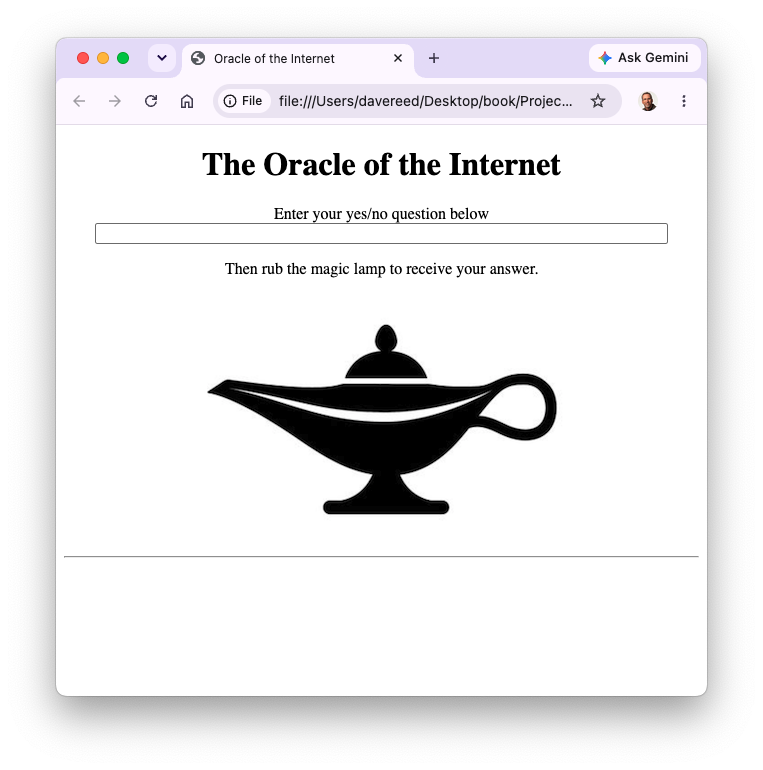
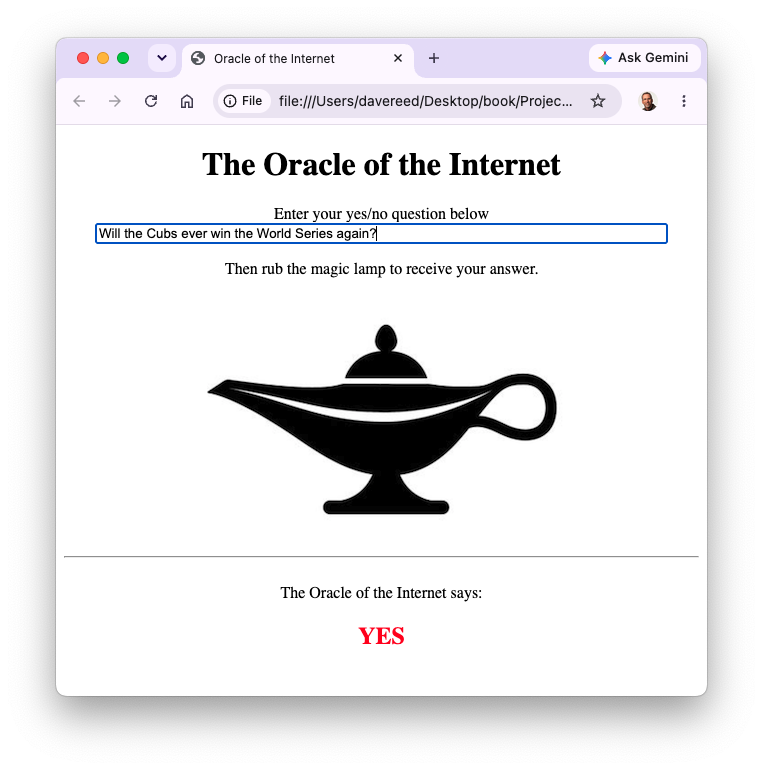
Create a Web page named oracle.html that simulates the functionality of an oracle by answering yes/no questions posed by the user. Your page should initially look like the screenshot on the left, with a text box for entering a question and some interactive image (the choice of image is up to you). When the mouse moves over the image, a function should be called to select a random response from a list of at least five possible responses (using the RandomOneOf function from the random.js library) and display the response in a page division, as shown on the right. When the mouse moves off, the answer should disappear. The oracle's answer should be in a large, red font. For example,
PROJECT 7.D: Rock-paper-scissors (also known as ro-sham-bo) is a hand game often used by two people to make a decision. Each player simultanteously chooses between three different hand shapes: a closed fist ✊ (representing "rock"), an open hand ✋ (representing "paper"), or two extended fingers ✌ (representing "scissors"). The winner is determined by the following rules: rock beats scissors, paper beats rock, and scissors beat paper. If the two players choose the same shape, a tie is declared and the they must choose again. While the game might at first seem totally random, it can in fact be played with some skill by recognizing and predicting non-random patterns in the opponent's choices (e.g., tending to repeat the same shape after a tie).
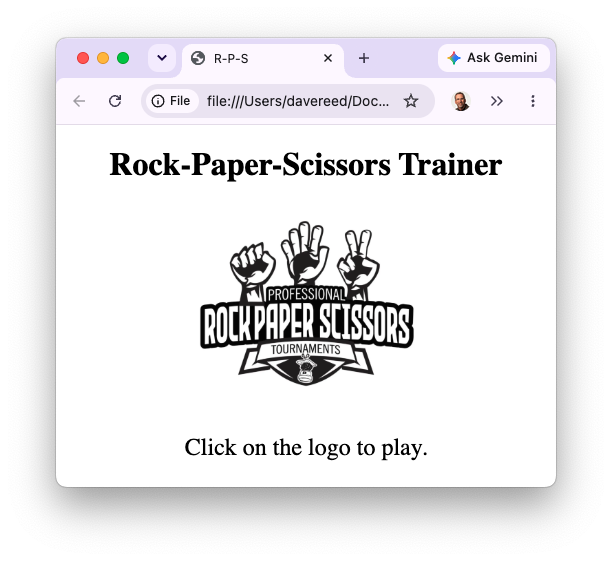
To brush up on your rock-paper-scissors skills, create a Web page named rps.html that enables you to practice against the browser. Initially, the page should display a heading, a default image, and instructions (all centered) as shown on the left:
The page should load the random.js library file and call the appropriate function(s) to exhibit the following behaviors.
- When you move the mouse over the image, the image should double in size. Likewise, it should return to its default size when you move the mouse out.
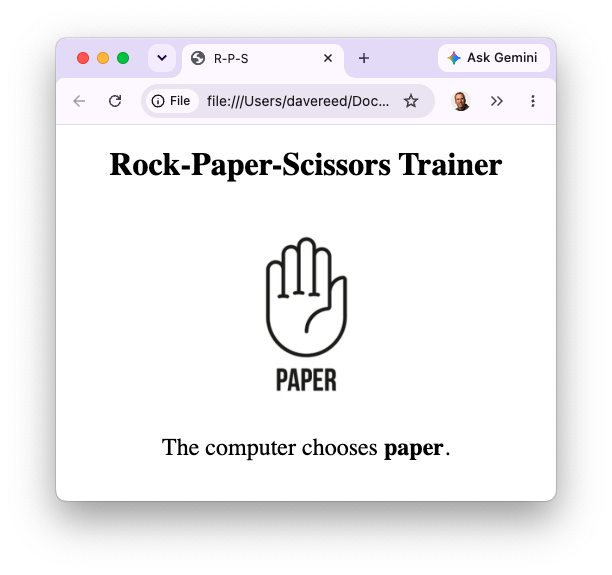
- When you click on the image, a random response (either rock, paper or scissors) should be randomly chosen by the page. The image should change to visually display that choice and the message below should state "The computer chooses X.", where X is the choice (displayed in bold), as shown on the right. The following image files are available from the book site, but you are free to choose your own.
      https://freecsc.com/Images/rock.png
      https://freecsc.com/Images/paper.png
      https://freecsc.com/Images/scissors.png
PROJECT 7.E: Heron's formula can be used to calculate the area of a triangle given the lengths of its sides (s1, s2 and s3):
area = √p(p-s1)(p-s2)(p-s3) where p=(s1+s2+s3)/2
Download a copy of the Triangle page from EXAMPLE 7.3 and save it under the name triangle.html. from the book's code directory and store it on your computer under the same name.
- Create a library file named
geometry.json your computer (in the same directory as yourtriangle.htmlpage). Cut-and-paste the definition of theDistancefunction into this library file. In addition, add a function namedTriangleAreathat calculates the area of a triangle using Heron's formula. The function should take three inputs, representing the lengths of the three triangle sides. For example, the callTriangleArea(3,4,5)should return 6. - Modify your
triangle.htmlpage so that it utilizes the functions from yourgeometry.jslibrary file to calculate and display the side lengths, perimeter, and area of the triangle. All the numbers should be rounded to 3 decimal places when displayed. For example,